DFRobot has released seeMote Cube, a handheld spatial input device aimed at developers building Apple Vision Pro applications. The 56mm cube packs six-degree-of-freedom position and orientation tracking, six programmable buttons, and vibration-based haptic feedback into a single enclosure. It is priced at 299 USD (about 47,000 yen) and listed as in stock, with a limit of five units per customer.
※1 USD = 157 JPY (as of August 1, 2026)
Adding a Grippable Input Layer to Eyes and Hands
Standard interaction on Apple Vision Pro relies on gaze and hand gestures: look at something, then pinch. That approach requires no extra hardware, but it adds steps when you need to nudge an object precisely or switch quickly between confirming and undoing. The gap shows up most in professional workflows, such as rotating a 3D model for inspection or signing off on checklist items one at a time.
visionOS 27 includes Apple's own mechanism for handling spatial accessories, the Spatial Accessory API, which lets an app read the position and orientation of an external device. Apple's spatial accessory stack combines inertial sensing with infrared tracking to deliver low-latency 6DoF positioning at up to 90Hz, and it keeps tracking in dim conditions. seeMote Cube is off-the-shelf hardware built to drop into that pipeline, so developers can start prototyping physical input without designing a controller from scratch.
DFRobot is a Shenzhen-based open-source hardware maker, and this is not an Apple partner product. The company states on its own site that it is not affiliated with or endorsed by Apple Inc.
Six Buttons and a Vibration Motor in a 56mm Cube
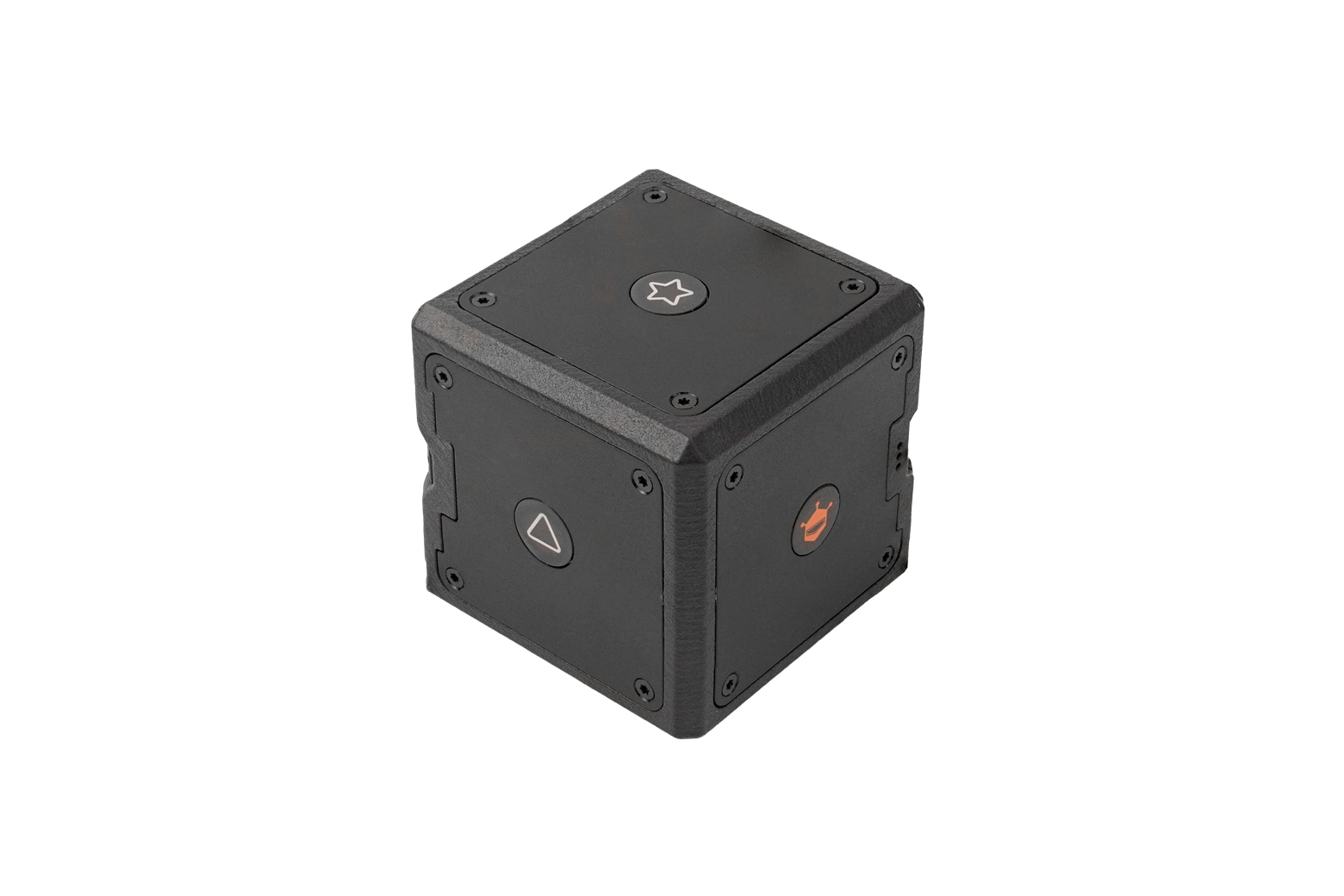
The device is a 56 × 56 × 56mm cube weighing 97.3g. It fits in one hand, and moving, rotating, or tilting it can be mapped directly to the position and orientation of a virtual object, pointer, handle, or virtual tool.
Six buttons are distributed across the faces of the enclosure and identified by a logo, cross, triangle, square, star, and hexagon. None of their behavior is fixed in hardware: the application decides whether a press means select, confirm, undo, change mode, reset the scene, or activate a virtual tool. The built-in vibration motor works the same way, letting developers fire haptic patterns on selection, contact, boundary detection, warnings, errors, or task completion.
Key specifications are as follows.
| Item | Details |
|---|---|
| Product name | seeMote Cube (SKU DFR1280) |
| Platform | Apple Vision Pro / visionOS 27 |
| Tracking | 6DoF, 360-degree coverage with no blind spots |
| Operating environment | Bright ambient light through complete darkness |
| Physical buttons | 6 programmable |
| Haptic feedback | Vibration motor |
| Connectivity | Bluetooth |
| Battery | 500mAh / 3.7V, rechargeable |
| Charging | USB Type-C (5V) |
| API / SDK | Apple Spatial Accessory API / Swift |
| Dimensions | 56 × 56 × 56mm |
| Weight | 97.3g |
DFRobot claims 360-degree tracking coverage with no blind spots and operation from bright ambient light down to total darkness. Its wiki, however, excludes direct sunlight and gives no figures for outdoor tracking, so indoor use is the reasonable assumption. Three indicator lights on the body report Bluetooth status, charging, and low battery. The box contains the Cube, a USB Type-C cable, and a quick-start guide.
Sample Code and a USDZ Model Ship in the Box
With a device like this, the real work usually sits on the software side. Using Apple's AccessoryTrackingProvider means preparing the accessory for tracking and integrating its reference accessory file into the app.
seeMote Cube ships with the material to cover that step: a .referenceaccessory file, a USDZ model, an integration guide, and a Swift sample app called seeMoteViewer published on GitHub. The sample discovers devices connected as GCSpatialAccessory, retrieves tracked anchors through AccessoryTrackingProvider, and renders 3D models tied to the Cube's location inside a mixed immersive space.
The bundled demo is a Mars rover model with 27 movable parts that can switch between exploded and collapsed animations. Developers can animate only the model anchored to the Cube, or drive placed replicas at the same time. Haptics run through CHHapticEngine, rendering through RealityKit, and session management through ARKit, and the repository also exposes components for Bluetooth accessory monitoring, model loading, and scene state management.
Running the example on real hardware requires an Apple Vision Pro, a compatible Mac, Xcode 27 beta or later, and the visionOS 27 SDK. One caveat worth noting up front concerns permissions: Apple's advanced accessory tracking entitlement is not included by default, and the repository notes it must be requested before the related capabilities can be used on a physical device.
Target Use Cases: Inspection, Robotics, and Model Review
The applications DFRobot lists lean toward professional work. Spatial inspection, where you move through defined checkpoints in a digital twin, review status in context, and confirm findings with a physical button. Robot path review, where a tangible 6DoF reference helps you revisit a planned motion sequence, place waypoints, and validate the proposed movement. Layer-by-layer review of complex models. All of these go beyond passive viewing, splitting the work so that Cube motion handles viewpoint and object orientation while the buttons handle confirmation and command execution.
A second product in the series, seeMote Cap, has been announced as a tracking module that mounts onto physical tools to bring their 6DoF motion into visionOS apps. It is due in the fall of 2026, and it covers only 6DoF tracking, Bluetooth, and USB Type-C, leaving buttons and haptics to the Cube.
The 299 USD price is best measured against what it would cost to assemble an IMU, infrared markers, wireless, buttons, haptics, power management, an enclosure, and visionOS integration assets yourself. This is not a controller for shipping consumer products; it is a tool for development and validation.
Summary
seeMote Cube is a 56mm handheld input device built around Apple Vision Pro's spatial accessory support. Alongside 6DoF tracking, six programmable buttons, and haptic feedback, it includes sample code, a USDZ model, and a reference accessory file, so prototyping physical input can start immediately. The price is 299 USD with a limit of five units per customer. Before testing on real hardware, keep in mind that you will need a Vision Pro, Xcode 27 beta or later, and an approved entitlement request from Apple.