
When you need to sign in to your Apple ID from an app on an old version of MacOSX (macOS) such as Snow Leopard, the form for entering the two-factor authentication code may not appear.
The Problem Screen
For example, when you try to sign in to the App Store from Snow Leopard, you'll see a screen like this.
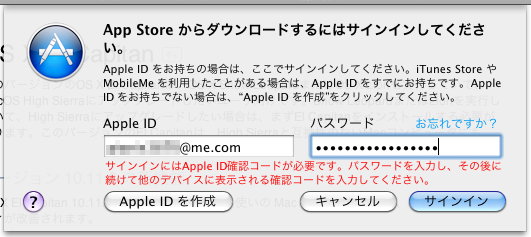
You're asked for two-factor authentication, but no input form is displayed.
By the way, the verification code is being shown on the iPhone side.
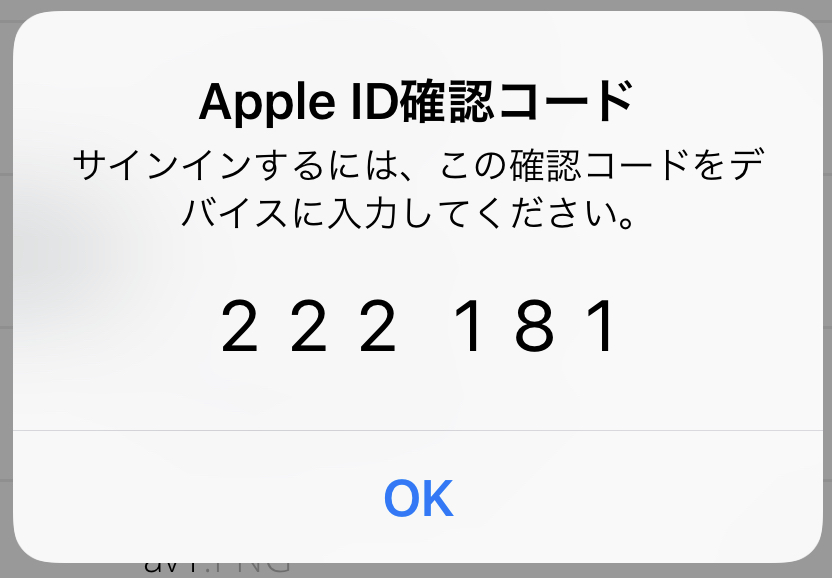
Just Type the Verification Code Right After Your Password
Enter your usual Apple ID password and then type the verification code immediately after it. That's it.

Like this — you type them both in as if they were a single password.
It's a slightly unfamiliar method so I was a bit puzzled at first, but with this I was able to sign in without any trouble.