Apex Legends is free to play and a ton of fun — I love it too. Season 1 just started and a new character has been added, so I'm looking forward to all the updates to come. The thing is, when you actually play, you run into so many cheaters and Chinese spam-business players that it's often hard to enjoy the game. Sometimes the moment a match starts, you're greeted by Chinese voice chat, and then end up playing a man down. Apex is a 3-player squad game, so even one missing teammate puts you at a serious disadvantage. (Maybe a hardcore gamer can still pull it off?)
The Japanese Server Has a Lot of Spam Players
If you play from Japan, the Japanese server is normally selected automatically. But right now, the Japanese server has a huge number of cheat-selling spam accounts on it. (At the time of writing.) On weekday afternoons, you might count yourself lucky if every player on your squad is actually a human.
Let's Change Your Play Server
The option is hidden by default, but Apex actually has a menu for switching servers, and if you go through the right steps, you can play on servers other than Japan.
1. Wait More Than 1 Minute on the Title Screen
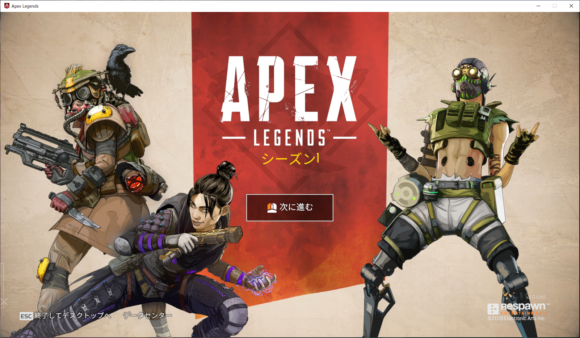
Launch the game, and once "Press to Continue" is displayed, leave it alone for over 1 minute. Cutting it too close doesn't work, so around 1 minute and 10 seconds is the sweet spot.
2. Click the Screen and Immediately Press [Esc]
Once enough time has passed, click the screen and immediately press the "Esc" key. If "Data Center" appears in the lower left while you're still on the title screen, it worked.
3. Pick a Server From the Data Center
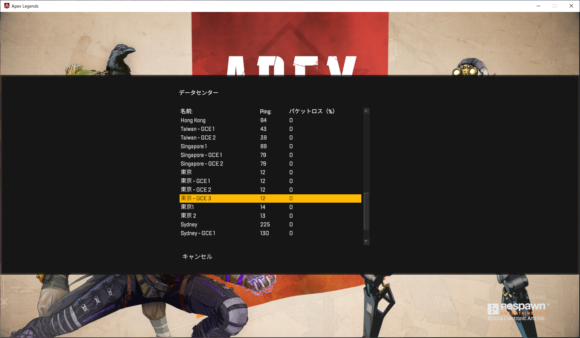
Click "Data Center" and the server selection screen will come up. By default "Tokyo" is selected, so change it to whichever one you like. Just keep in mind, when you switch, choose a server with low ping. If you pick a server with high ping, you'll end up with awful lag instead. The lower the ping number, the less lag you'll get. I personally always play on "Singapore 1." There are still cheaters from time to time (probably the same everywhere), but there are relatively few spam players, and lag isn't an issue.
Heads Up — It Resets When You Quit the Game!
Even after you change servers, the setting reverts the moment you exit the game. To keep playing on your favorite server, you'll need to redo this procedure every time you launch the game, so keep that in mind.
List of Available Servers
| Name | Ping (reference) |
|---|---|
| Salt Lake City | 138 |
| Oregon - GCE 1 | 99 |
| Oregon - GCE 2 | 100 |
| Oregon 1 | 119 |
| Oregon 2 | 138 |
| St Louis | 153 |
| Dallas | 138 |
| Iowa - GCE 1 | 138 |
| Iowa - GCE 2 | 137 |
| Iowa - GCE 3 | 139 |
| Iowa - GCE 4 | 138 |
| New York | 183 |
| South Carolina - GCE 1 | 166 |
| South Carolina - GCE 2 | 166 |
| South Carolina - GCE 3 | 166 |
| Virginia 1 | 181 |
| Virginia 2 | 194 |
| Sao Paulo | 277 |
| Sao Paulo - GCE 1 | 272 |
| Sao Paulo - GCE 2 | 270 |
| Sao Paulo 1 | 292 |
| Sao Paulo 2 | 290 |
| London | 246 |
| Amsterdam | 244 |
| Belgium - GCE 1 | 237 |
| Belgium - GCE 2 | 240 |
| Belgium - GCE 3 | 234 |
| Frankfurt 1 | 255 |
| Frankfurt 2 | 234 |
| Hong Kong | 84 |
| Taiwan - GCE 1 | 43 |
| Taiwan - GCE 2 | 39 |
| Singapore 1 | 89 |
| Singapore - GCE 1 | 79 |
| Singapore - GCE 2 | 79 |
| Tokyo | 12 |
| Tokyo - GCE 1 | 12 |
| Tokyo - GCE 2 | 12 |
| Tokyo - GCE 3 | 12 |
| Tokyo 1 | 14 |
| Tokyo 2 | 13 |
| Sydney | 225 |
| Sydney - GCE 1 | 130 |
| Sydney - GCE 2 | 129 |
| Sydney 1 | 208 |
| Sydney 2 | - |
Ping numbers vary depending on your environment, so use these only as a rough guide.