When using Google AdSense, you may notice ad slots on your site with unfamiliar names. The truth is that AdSense sometimes serves ads from delivery platforms separate from Google itself — for example, a different company called "Unicorn" (formerly Bulbit) also delivers ads through this channel. These ads share a few quirks: clicks generate no revenue, so earnings are limited to impressions. What's troublesome from a site owner's standpoint is that they can deliver overly suggestive imagery or grotesque, otherwise inappropriate ads. You can't block them individually from the AdSense dashboard either, which can become a serious problem depending on the kind of site you run.
Steps to block an ad delivery platform
You can block the offending ad delivery platform from the AdSense dashboard. The steps are below.
(1) Click "Blocking controls" → "All sites." (2) Click "Manage ad networks."
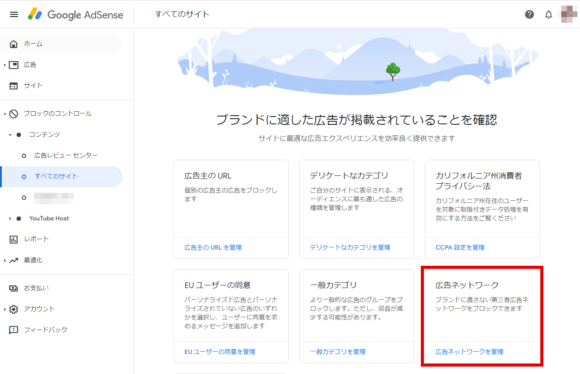
(3) Type the name of the ad network you want to block into the search box. For Unicorn, type "Bulbit."
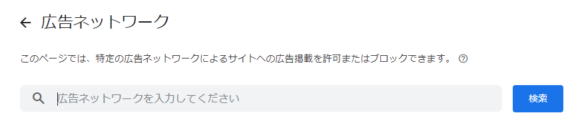
(4) If it's marked "Allowed," click it to switch it to blocked.
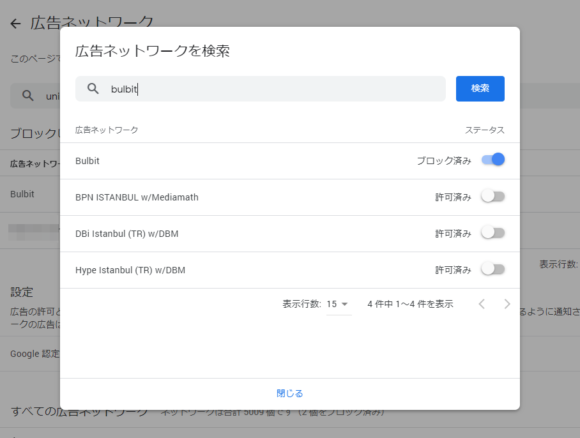
That's it — you've cut down on the inappropriate ads.
To keep your site's image intact
Even if you think you've been weeding out inappropriate ads through the Ad Review Center, traps like this one can still slip through, so it pays to be careful. Depending on your site, the wrong ad can damage your brand image, so go ahead and lock this setting in.


















![[For Site Owners] How to Block Risqué AdSense Ads Like "Unicorn"](https://claypier.com/wp-content/uploads/2020/12/AdobeStock_291769572_Editorial_Use_Only-480x320.jpeg)