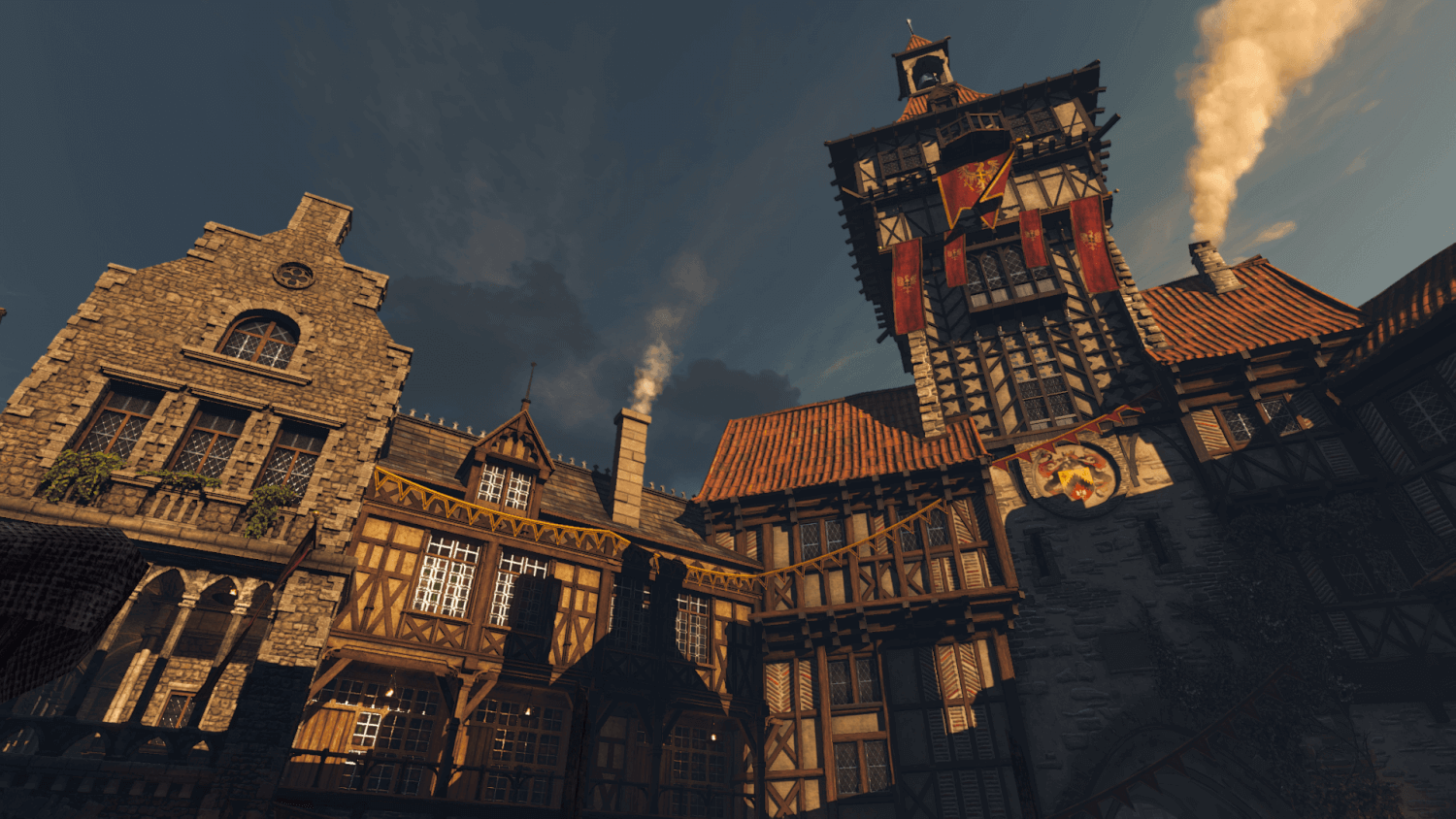
The Witcher 3: Wild Hunt was released in 2015 and is a major title that even won Game of the Year.
For games that sell well, the modding scene tends to be lively too, and if you search for "The Witcher 3 Mod" you can find plenty of sites that introduce mods even in Japanese. However, many of those posts are from around 2017–2020, and it felt like a waste that the excellent mods released after that period weren't being introduced. So this time I'd like to mainly cover mods that improve the graphics, as of March 2022.
The author's PC specs: CPU: AMD Ryzen 5 5600X GPU: Palit GeForce GTX 1080 8GB RAM: Crucial Ballistix DDR4-3200 32GB (16GB×2) Storage: SanDisk SSD Ultra 3D 1TB (SATA 3.0) OS: Windows 10
With the specs above, I'm building a setup that can basically deliver 60 fps.
Use mods entirely at your own risk.
How to Install
Prepare a backup so you can restore things if installation fails. Copy the The Witcher 3 folder "steamapps\common\The Witcher 3" and duplicate it to your desktop or somewhere else. (If you ever want to roll back, delete the The Witcher 3 folder on the steamapps side and put the copy back in the same location.)
Download "CommunityPatch-Base" from Community Patch - Base. Place the "content" and "Mods" folders from the unzipped folder into the "steamapps\common\The Witcher 3" directory and overwrite. (A NexusMod account is required to download.)
Download "modlimitpatcher.exe" from Mod limit fix. Place the downloaded "Mod limit executable patcher-3643-1-0-1556453467.exe" into "steamapps\common\The Witcher 3\bin\x64" and run it.
Download "Witcher Script Merger v0.6.5" from Script Merger. Run "WitcherScriptMerger.exe" and, for the Witcher 3 Directory, select the folder where the game is installed.
Copy the code below into "mods.settings" inside "Documents\The Witcher 3" and save. (If mods.settings doesn't exist, just create a new text file and rename it. ※Make sure file extensions are visible.)
[mod0000____CompilationTrigger]
Enabled=1
Priority=0

[modTweaks]
Enabled=1
Priority=0

[modSmoke]
Enabled=1
Priority=1

[modViperHDChains]
Enabled=1
Priority=1

[modVolumetricClouds_PLM_Patch]
Enabled=1
Priority=1

[modRusticPines]
Enabled=1
Priority=1

[modFabricWind]
Enabled=1
Priority=1

[modHairLodIncrease]
Enabled=1
Priority=1

[modHairLodIncrease]
Enabled=1
Priority=1

[mod4KSoftClouds]
Enabled=1
Priority=1

[modDarkerGenericTreesAndBushes]
Enabled=1
Priority=1

[modAlternativeChimneySmokeMaterials4]
Enabled=1
Priority=1

[mod1ahdcowsblackandbrown]
Enabled=1
Priority=1

[modaHDBirds_v11]
Enabled=1
Priority=1

[modHDTreeBillboards]
Enabled=1
Priority=1

[modHDTreeBillboardsBnW]
Enabled=1
Priority=1

[mod0Meadows]
Enabled=1
Priority=1

[modE3Wall]
Enabled=1
Priority=1

[modHC4K04HighQualityGeralt]
Enabled=1
Priority=10

[modHC4K03ChildrenVanilla]
Enabled=1
Priority=10

[modHC4K02FemalesVanillaShaved]
Enabled=1
Priority=10

[modHC4K01MalesVanilla]
Enabled=1
Priority=10

[modz_4KArmorTextures]
Enabled=1
Priority=15

[modHDAnimalsReworked]
Enabled=1
Priority=20

[modBrothelLanterns]
Enabled=1
Priority=25

[mod_HDToussaintPalace_HDRP_Patch]
Enabled=1
Priority=30

[modATrueFiresHDReworkedProjectCompatibility]
Enabled=1
Priority=30

[modTempleIsleLOD]
Enabled=1
Priority=30

[modHDToussaintPalace]
Enabled=1
Priority=35

[modTrueFires]
Enabled=1
Priority=35

[modTrueFire_part1_performance_v3]
Enabled=1
Priority=35

[modNovigradReloadedFullPackage]
Enabled=1
Priority=40

[modZ_Phoenix_Ultimate_7]
Enabled=1
Priority=45

[modHDReworkedProject]
Enabled=1
Priority=50

[modHDReworkedProject2]
Enabled=1
Priority=50

[modHDReworkedProject3]
Enabled=1
Priority=50

[modHDReworkedProject4]
Enabled=1
Priority=50

[modMoreShadows_Toussaint]
Enabled=1
Priority=55

[modRF4kAIClutter]
Enabled=1
Priority=100

[modRF4kAIWyzima]
Enabled=1
Priority=100

[modOver9000]
Enabled=1
Priority=105

[modPhysicsForAll]
Enabled=1
Priority=105

[modMine]
Enabled=1
Priority=105

[modBugFix__MasterCollection01xml]
Enabled=1
Priority=110

[modBugFix__MasterCollection01]
Enabled=1
Priority=110

[modBugFix__MasterCollection01Scripts]
Enabled=1
Priority=110
Once you're done with the steps above, check that the game launches correctly. If there are no problems, the initial setup is complete.
About the NexusMods Warning
When downloading certain mods, a warning like this may appear.
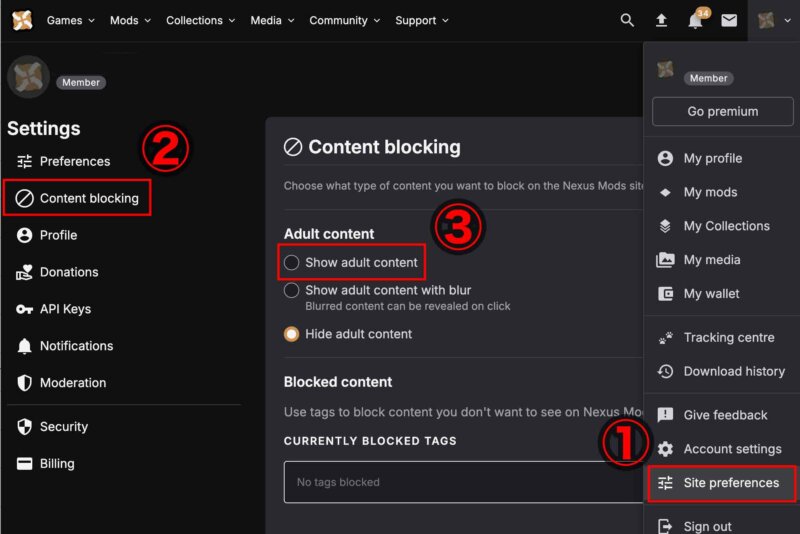
Adult content This mod contains adult content. You can turn adult content on in your preference, if you wish
To dismiss the warning, you need to be 18 or older, register an account, and change your settings. After logging in, go to "Site preferences" → "Content blocking" → "Show adult content" and check the box. Once this is set, you'll be able to download mods that require age verification.
Graphics Mods
The Witcher 3 HD Reworked Project (Required)
A massive mod that cleans up almost every texture in the game. If this is your first time installing mods, set yourself the goal of installing this and Tweaks (below) at minimum. ※Because it overwrites the bin folder, you must add "The Witcher 3 HD Reworked Project" before "Tweaks", without exception. Download "The Witcher 3 HD Reworked Project Ultimate". Overwrite the contents of the "bin" folder into "steamapps\common\The Witcher 3\bin". Add the contents of the "Mods" folder into "steamapps\common\The Witcher 3\mods".
Tweaks (Required)
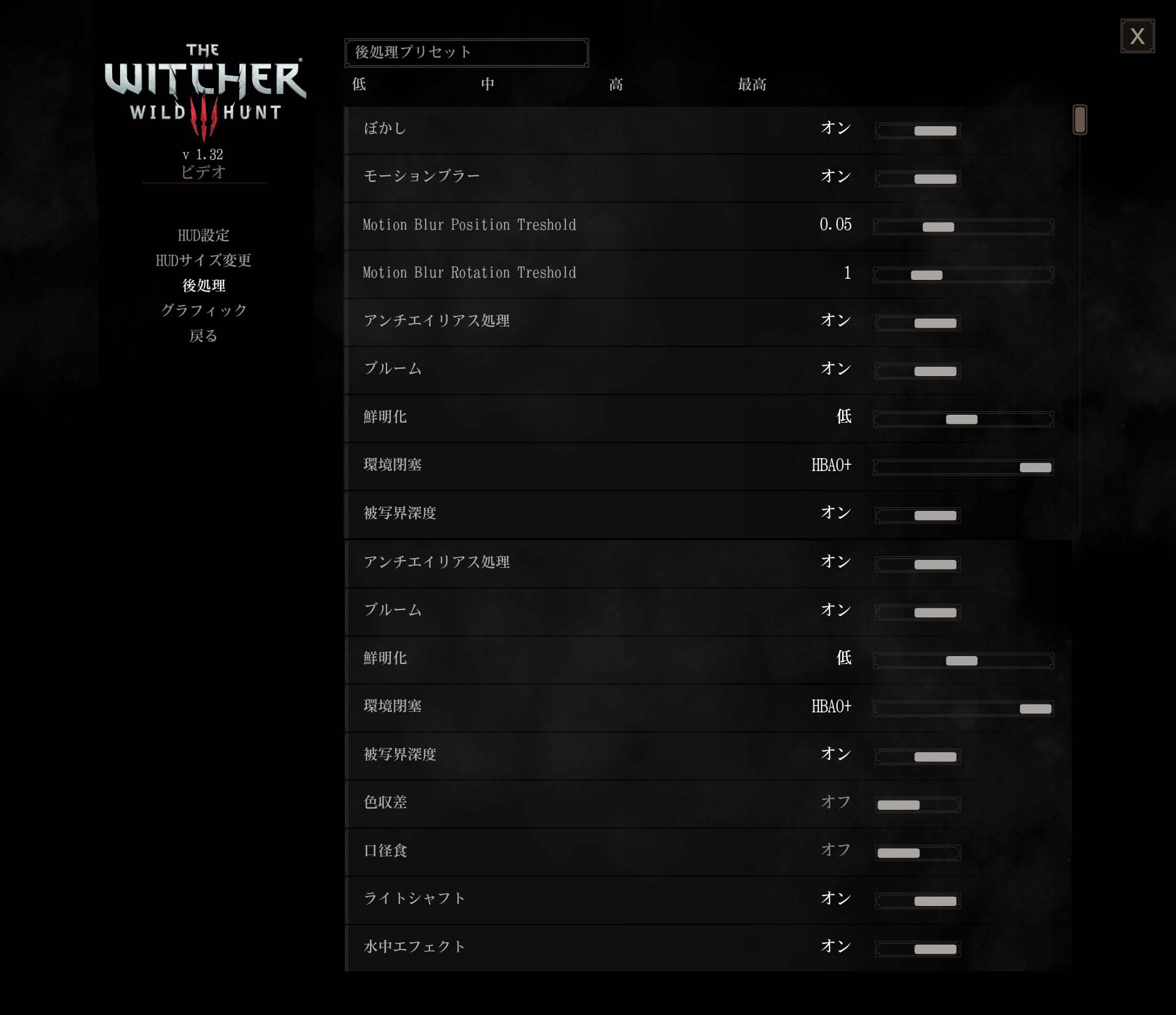
Download "Tweaks (all presets)". Overwrite the contents of the "bin" folder into "steamapps\common\The Witcher 3\bin". Add the contents of the "mods" folder into "steamapps\common\The Witcher 3\mods". ※Because it overwrites the bin folder, you must add "Tweaks" only after installing "The Witcher 3 HD Reworked Project". Graphics settings get expanded, allowing you to push beyond the default options. That said, if you crank settings too high you can exceed the engine's tolerance and end up with display glitches or unstable behavior, so use the image below as a reference when tweaking your settings.
Click the image to enlarge it.

rfuzzo's AI 4K Upscaled Project - Clutter (Recommended)
A mod that cleans up about 700 small-prop textures like books and the like. Download "modRF4kAIClutter". Add the "modRF4kAIClutter" folder from the download into "steamapps\common\The Witcher 3\mods".
rfuzzo's AI 4K Upscaled Project - Wyzima (Recommended)
A mod that cleans up the textures of Vizima. Download "modRF4kAIWyzima". Add the "modRF4kAIWyzima" folder from the download into "steamapps\common\The Witcher 3\mods".
Humans of the Continent 4K-2K Textures (Recommended)
With over 650 texture files, it cleans up every skin texture. Download "A1. Males of the Continent", "B1. Females of the Continent - Shaved Option", "C1. Children of the Continent", and "High Quality Geralt". Add "modHC4K01MalesVanilla", "modHC4K02FemalesVanillaShaved", "modHC4K03ChildrenVanilla", and "modHC4K04HighQualityGeralt" into "steamapps\common\The Witcher 3\mods".
Meadows-Efflorescent Grass Mod (Recommended)
A mod that changes the look of the grass growing on the roads. The vanilla, spiky-looking grass is replaced with softer-looking grass, and the impression changes considerably. Download "Meadows". Add the "mod0Meadows" folder from the download into "steamapps\common\The Witcher 3\mods".
Phoenix Lighting Mod (Recommended)
The in-game lighting is changed and the atmosphere shifts dramatically. The exact result varies depending on the monitor you're using, but because nights become pitch-black, adjusting the gamma or tweaking the colors a bit with ReShade tends to make it more comfortable to play. Download "Ultimate 7.0". Add the contents of the "mods" folder from the downloaded folder into "steamapps\common\The Witcher 3\mods". Add the contents of "dlc" into "steamapps\common\The Witcher 3\DLC".
4K Armor Textures (Recommended)
A mod that changes the armor textures. Overall, the look becomes more subdued. Download "4K Armor Textures". Add the "modz_4KArmorTextures" folder from the download into "steamapps\common\The Witcher 3\mods".
HD Chainmail for Viper Armors (Recommended)
Fixes the belly and back textures of the "Viper Armor". Download "HD Chainmail for Viper Armors". Add the "modz_4KArmorTextures" folder from the download into "steamapps\common\The Witcher 3\mods".
Next Gen Novigrad Reloaded 2 (Recommended)
A texture-replacement mod for Novigrad. LOD is also improved, which softens the issue of textures popping in as you walk around the city. Download "Next_Gen_Novigrad_Reloaded_1_and_2_Full_Package". Add the "modNovigradReloadedFullPackage" folder from the download into "steamapps\common\The Witcher 3\mods".
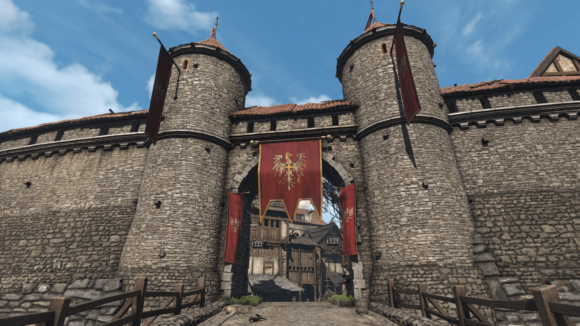
E3 Wall (Recommended)
A texture-replacement mod for the walls in Novigrad. LOD is also improved, mitigating the texture pop-in that happens when you get close to the walls. (This might actually be the main reason to install it.) Download "E3 Wall 1.1". Add the "modE3Wall" folder from the download into "steamapps\common\The Witcher 3\mods".
HDAR - HD Animals Reworked (Recommended)
A mod that changes the appearance of animals. The quality goes up considerably. Download "HD Animals Reworked". Add the "modHDAnimalsReworked" folder from the download into "steamapps\common\The Witcher 3\mods".
E3 HD Birds Reworked Project (Optional)
A texture-replacement mod for birds. There aren't many chances to see birds up close, but it's there if you want to chase perfection. Download "HD Birds". Add the "modaHDBirds_v11" folder from the download into "steamapps\common\The Witcher 3\mods".
E3 HD Cows Reworked Project (Optional)
A texture-replacement mod for cows. Up to your taste. Download "Black and Brown Cows without Bells". Add the "mod1ahdcowsblackandbrown" folder from the download into "steamapps\common\The Witcher 3\mods".
True Fires (Recommended)
A mod that significantly increases the rendering distance of light sources. The atmosphere at night changes. However, in towns where there are many light sources, framerate drops considerably; in the author's environment, performance fell from 60 fps to 45 fps. If you experience the same drop, I recommend the version posted on the forum that has reduced rendering distance. With this, the look stays almost the same and performance recovered to 60 fps. Download "True Fires - Part 1" and "True Fires Compatibility Patch - HD Reworked Project", and "True Fires - Part 2" from here. Add the "modTrueFires" and "modATrueFiresHDReworkedProjectCompatibility" folders from the download into "steamapps\common\The Witcher 3\mods". Add "dlcTrueFires" and "dlcATrueFiresHDReworkedProjectCompatibility" into "steamapps\common\The Witcher 3\dlc".
Download "v3 - all fires and light reduced to 900" from cptscotty's post on the forum. Add the "modTrueFire_part1_performance_v3" folder from the download into "steamapps\common\The Witcher 3\mods". If "modTrueFires" is still in the mods folder, delete it.
More Shadows for Toussaint (Recommended)
Adds shadows to light sources in Toussaint. Download "More Shadows for Toussaint". Add the "modMoreShadows_Toussaint" folder from the download into "steamapps\common\The Witcher 3\mods".
Brothel Lantern Utopia (Optional)
A mod that changes the lantern lighting. Up to your taste. Download "Brothelanterns". Add the "modBrothelLanterns" folder from the download into "steamapps\common\The Witcher 3\mods".
Darker Generic Trees and Bushes (Optional)
A mod that turns the leaves into a darker green. It creates more contrast with the shortest grass. Download "Darker Generic Trees and Bushes". Add the "modDarkerGenericTreesAndBushes" folder from the download into "steamapps\common\The Witcher 3\mods".
Rustic Pines (Optional)
A mod that turns pine needles brown. Download "Rustic Pines". Add the "modRusticPines" folder from the download into "steamapps\common\The Witcher 3\mods".
HD Tree LOD Billboards (Recommended)
A mod that improves tree LOD. The flat-looking impression goes away. Download "HD Tree LOD Billboards" and "HD Tree LOD Billboards for Blood and Wine". Add "modHDTreeBillboards" and "modHDTreeBillboardsBnW" from the download into "steamapps\common\The Witcher 3\mods".
Alternative Chimney Smoke (Optional)
A mod that makes chimney smoke more noticeable. Download "Version4_SmoothestPuffySmoke". Add "modAlternativeChimneySmokeMaterials4" and "modSmoke" from the download into "steamapps\common\The Witcher 3\mods".
Hair - increase LOD distance shift (Recommended)
A mod that increases hair LOD. It particularly helps for characters with bobbed hair. Download "Hair Lod Increase all-in-one-1.2". Add the "modHairLodIncrease" folder from the download into "steamapps\common\The Witcher 3\mods".
Temple Isle LOD and shadow fix (Recommended)
A mod that improves the LOD of the tower in Novigrad. Download "Temple Isle LOD". Add the "modTempleIsleLOD" folder from the download into "steamapps\common\The Witcher 3\mods".
HD Palace (Optional)
A mod that improves the LOD of the palace in Toussaint. Download "HD Toussaint Palace" and "HDRP Patch". Add "modHDToussaintPalace" and "mod_HDToussaintPalace_HDRP_Patch" from the download into "steamapps\common\The Witcher 3\mods".
System Mods
Fabric Wind Fix (Optional)
A mod that prevents flags from clipping into walls in the wind. Download "FabricWind". Add the "modFabricWind" folder from the download into "steamapps\common\The Witcher 3\mods".
Brothers In Arms - TW3 Ultimate Bug Fix Collaboration (Recommended)
A mod that fixes 586 bugs. Download "Brothers In Arms Ultimate Bug Fix Collaboration". Add "modBugFix__MasterCollection01", "modBugFix__MasterCollection01Scripts", and "modBugFix__MasterCollection01xml" from the download into "steamapps\common\The Witcher 3\mods".
Over 9000 - Weight limit mod (Optional)
A mod that bumps your carrying weight up to 9000. For those who want to play without being bothered by being over-encumbered. Download "Over 9000 - Weight limit mod v1.31". Add the "modOver9000" folder from the download into "steamapps\common\The Witcher 3\mods".
NPC Physics 60FPS FIX (Optional)
A mod that fixes a bug where physics doesn't compute correctly at 60 fps. If you install this mod when running below 60 fps, the physics ends up exaggerated, so check what kind of framerate you're typically getting. Download "PhysicsForAll". Add the "modPhysicsForAll" folder from the download into "steamapps\common\The Witcher 3\mods".
Ultimate Roach Improvement (Optional)
A mod that improves horse handling. Roach no longer gets stuck on rocks or trees, and you can ride in cities too. Download "roachUltimate". Add the "modMine" folder from the download into "steamapps\common\The Witcher 3\mods".