PHP Source Query is a PHP library that lets you grab information from game servers using Rcon and Query. With this you can monitor whether your own game server is alive, show the list of currently logged-in player names on your homepage, hand out items to in-game characters, and more.
GitHub - xPaw/PHP-Source-Query
https://github.com/xPaw/PHP-Source-Query
Requirements
PHP 5.5 (64-bit) or later
Supported Games
- Counter-Strike 1.6
- Team Fortress 2
- Left 4 Dead 2
- Counter-Strike: Global Offensive
- Rag Doll Kung Fu
- The Ship
- Garry's Mod
- Nuclear Dawn
- Dino D-Day
- Arma 3 (Query only)
- Call of Duty: Modern Warfare 3
- Starbound
- Space Engineers (Query only)
- Rust (Query only)
- Quake Live (Query only)
- ARK: Survival Evolved
- Minecraft (RCON only)
Downloading the Files
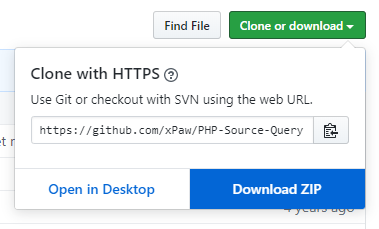
Download the source files from here. To download, click the green "Clone or download" button and then "Download ZIP".
Next, extract the downloaded ZIP file. The only folders you actually need to use from inside are "SourceQuery" and "Examples".
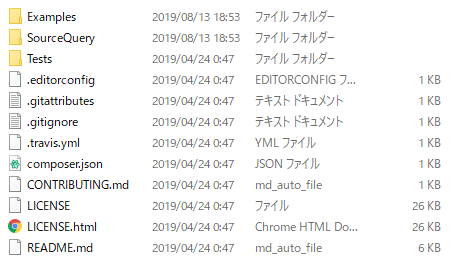
The Examples folder contains ready-made display samples, so we'll just reuse those this time. If you're using RCON, use RconExample.php; if you're using Query, use Example.php or View.php (a styled version, which is the recommended one).

Editing the Source
Before you use it, you need to edit the downloaded files. As an example here, let's connect to a Minecraft server with RCON. (I'll skip the rcon setup on the Minecraft side.) Edit the RconExample.php file in the Examples folder as shown below. Replace the IP address and RCON password with your own.
<?php
    require __DIR__ . '/../SourceQuery/bootstrap.php';

    use xPaw\SourceQuery\SourceQuery;

    // For the sake of this example
    Header( 'Content-Type: text/plain' );
    Header( 'X-Content-Type-Options: nosniff' );

    // Edit this ->
    define( 'SQ_SERVER_ADDR', 'XXX.XXX.XXX.XXX' );
    // (1) Enter the IP address of your game server
    define( 'SQ_SERVER_PORT', 25575 );
    // (2) Enter the rcon port of your game server
    define( 'SQ_TIMEOUT',     1 );
    define( 'SQ_ENGINE',      SourceQuery::SOURCE );
    // Edit this <-

    $Query = new SourceQuery( );

    try
    {
        $Query->Connect( SQ_SERVER_ADDR, SQ_SERVER_PORT, SQ_TIMEOUT, SQ_ENGINE );

        $Query->SetRconPassword( 'PASSWORD' );
        // (3) Enter the rcon password you set on the game server

        var_dump( $Query->Rcon( 'list' ) );
        // (4) Enter the command you want to run. "list" outputs the list of players.
    }
    catch( Exception $e )
    {
        echo $e->getMessage( );
    }
    finally
    {
        $Query->Disconnect( );
    }
Connecting to a Minecraft Server
Upload the finished file to your web server. When you access it from a browser, it'll display like this.
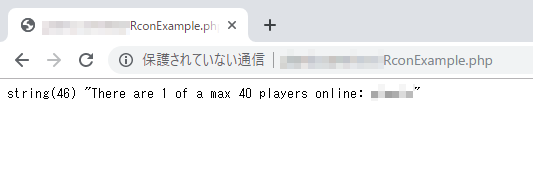
The user names and number of players logged into the server are shown.
If you see
Can't connect to RCON server: Connection refused
then communication with the game server isn't working, so review things like opening the rcon port and the game server's settings. Besides "list", you can run all kinds of commands available inside Minecraft from the web, like "say", "title", and "gamemode".

It'd be fun to use this to write a program that, say, randomly changes the difficulty at fixed intervals.
Connecting to a RUST Server
Since RUST isn't supported via RCON in this library, we use Query instead. In the same way as before, edit the IP address and port number parts of View.php and upload it. When you display it, it looks like this.
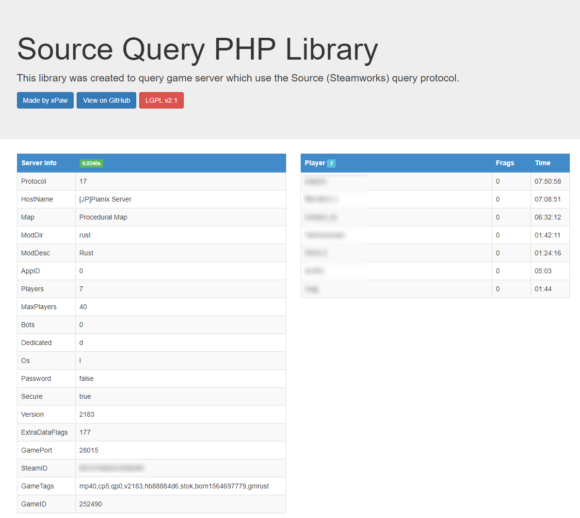
The server name, map size, seed value, number of logged-in users and so on are shown. Since this isn't RCON, you can't send commands, but you can get a general set of information. If you want to send RCON commands, Facepunch has an official "webrcon" tool you can use for that: https://github.com/Facepunch/webrcon/tree/gh-pages. Apart from that, there's also a non-browser "RustAdmin" tool. It's a great tool that lets you ping, kick, or ban users, change the server description, and so on while the server is running. With its event timer feature, you can even display a message when a user logs in: https://www.rustadmin.com/
A Note on Security
Since rcon lets commands be executed externally, always use a complex rcon password. Also, depending on the command you can stop the server, or even BAN or KICK, so handle it with plenty of care.