

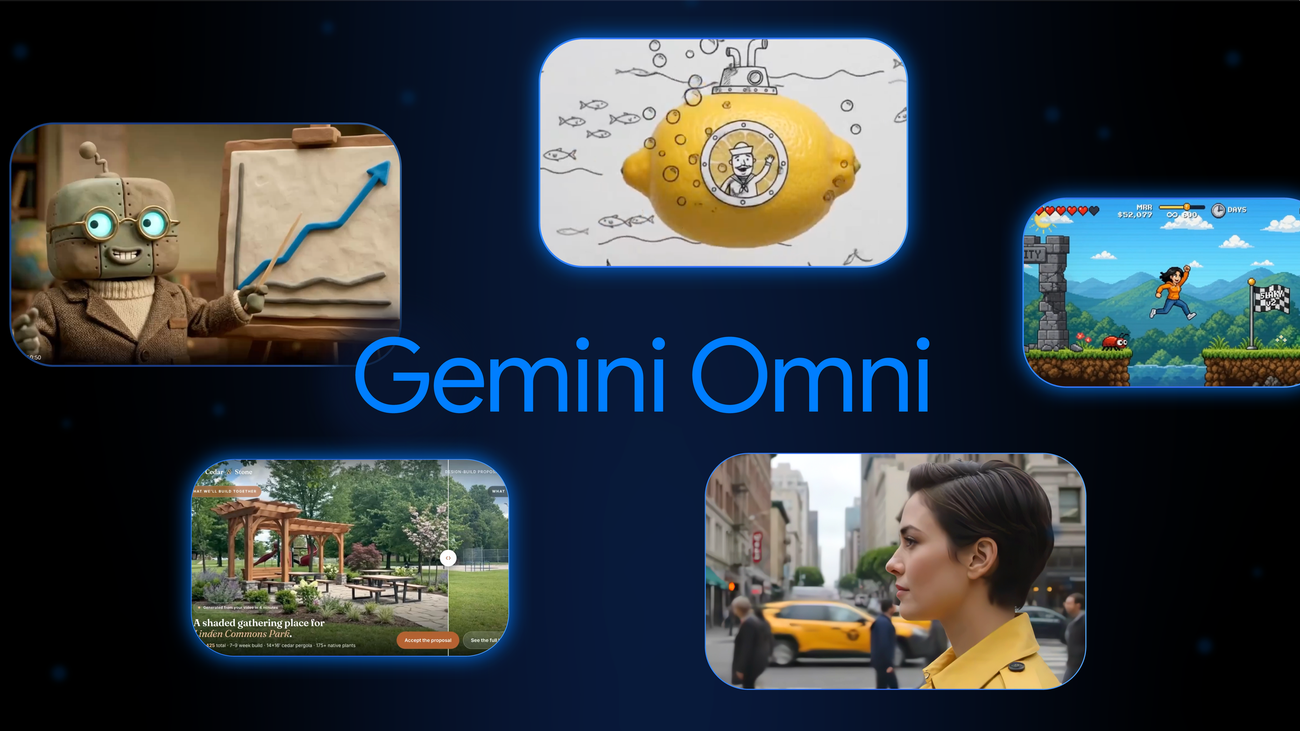
Google has published five projects that developers built with its video generation AI, Gemini Omni[1]. One recreates a single scene from roughly 20 camera angles. Another turns day into night and adds falling snow using voice alone. A third uses hand-drawn doodles as motion instructions. All of them assemble video through conversation or simple inputs. About a month after developer access opened, it is becoming clearer what the model can actually do.
Recreating One Scene from About 20 Angles
The first demo is about camera work. Builder Leon Lin generated roughly 20 different viewpoints from a single video of a woman standing in a city[1]. The same person appears close up and far away, head on and in profile, from above and from below. Some shots zoom in while others hold still.
The background shifts as well, moving between sidewalks, crosswalks and city streets filled with pedestrians, cars, trams and different buildings. Being able to swap angles without reshooting is useful when reviewing storyboards, or when producing several variations of the same footage for social media.
Turning Day into Night and Adding Snow with Voice Alone
The second demo rebuilds the scene itself. Builder Carlos Santana used only his voice to edit an outdoor video, switching the lighting from day to night, adding cloudy skies and rain sounds, turning the leaves orange and covering the ground in snow[1].
Weather and season are the hardest elements to redo in live-action shooting. Google says Omni keeps a scene coherent even when the action is edited or objects are swapped out. How well the model avoids the familiar failure mode of generative video, where changing one element breaks the whole frame, will decide how practical this feature is.
Doodles as Motion Instructions
The third demo uses Omni inside Google Flow, Google's video editing tool. Sketches can be converted into realistic video, with the drawn lines guiding how individual elements move[1]. Creators can also decide whether those hand-drawn marks remain in the final output.
Builder Pan used this to transform everyday objects one after another. A lemon becomes a submarine bobbing in the ocean. A cup of espresso turns into a hot air balloon carrying someone through the sky. Two hot peppers form a sleeping dragon that breathes fire when startled. A match is recast as a rocket ship, and scissors become a shark hunting for a snack.
There are plenty of moments when drawing a single line is faster than describing motion in words. Offering a drawing-based input path, rather than relying on prompts alone, suggests a design aimed at non-engineers as well.
From Live Action to Anime to Claymation in One Clip
The fourth demo swaps the visual style entirely. Supply reference material or describe the look in natural language, and Omni blends it into a single cohesive clip[1].
Builder Jerrod Lew used Omni in Google Flow to render a video of a woman walking down the street in four different animation styles. The original clip shifts fluidly from live action to anime to claymation without interruption, and her forward motion never breaks. Whether a subject's movement survives a style change is a straightforward way to gauge how accurate this class of model is.
Turning Proposals and Dashboards into Video
The fifth demo steps away from pure creative work toward business use. The team at Hyperagent visualized three concepts with Omni[1]. They layered landscaping into a video of an empty park to create a before-and-after design proposal. They personified data with an animated professor explaining business dashboards. And they gamified a to-do list with a video of a character clearing tasks.
The idea is to replace proposals and internal documents that previously relied on still images and slides. If a moving proposal can be produced without a shoot or an outside vendor, this is the kind of use case that gets adopted on cost grounds alone.
Availability and Current Limits
Gemini Omni is available in the Gemini app, Google Flow, Google AI Studio, the Gemini API and the Gemini Enterprise Agent Platform[1]. Developer access began on June 30, 2026, and the model is identified as gemini-omni-flash-preview[2].
Pricing is 0.10 USD per second of video output (about 16 yen), the same level as Veo 3.1 Fast[2]. Limits remain, however. Generations are currently capped at 10 seconds. Uploading audio references and scene extension are not yet supported in the Gemini API, and while video references of up to 3 seconds are accepted by the API schema, the model does not process them correctly at this time. Google also notes limitations in character consistency across scene changes and panning movements[2].
Outputs carry SynthID watermarking, and AI-generated content can be verified through the Gemini app, Chrome or Search[2].
※1 USD = 159 JPY (as of August 11, 2026)
Summary
The five demos Google published divide cleanly into angle changes, weather and season swaps, doodle-driven motion, style conversion and business document video. What they share is that none of them assume reshoots or specialist tools. At the same time, the 10-second ceiling and the consistency issues around scene transitions are still in place. The gap between how striking the demos look and what the current specifications allow is the thing to weigh when deciding which part of a workflow this belongs in.
Source[1]:https://blog.google/innovation-and-ai/models-and-research/gemini-models/gemini-omni-builders/



























