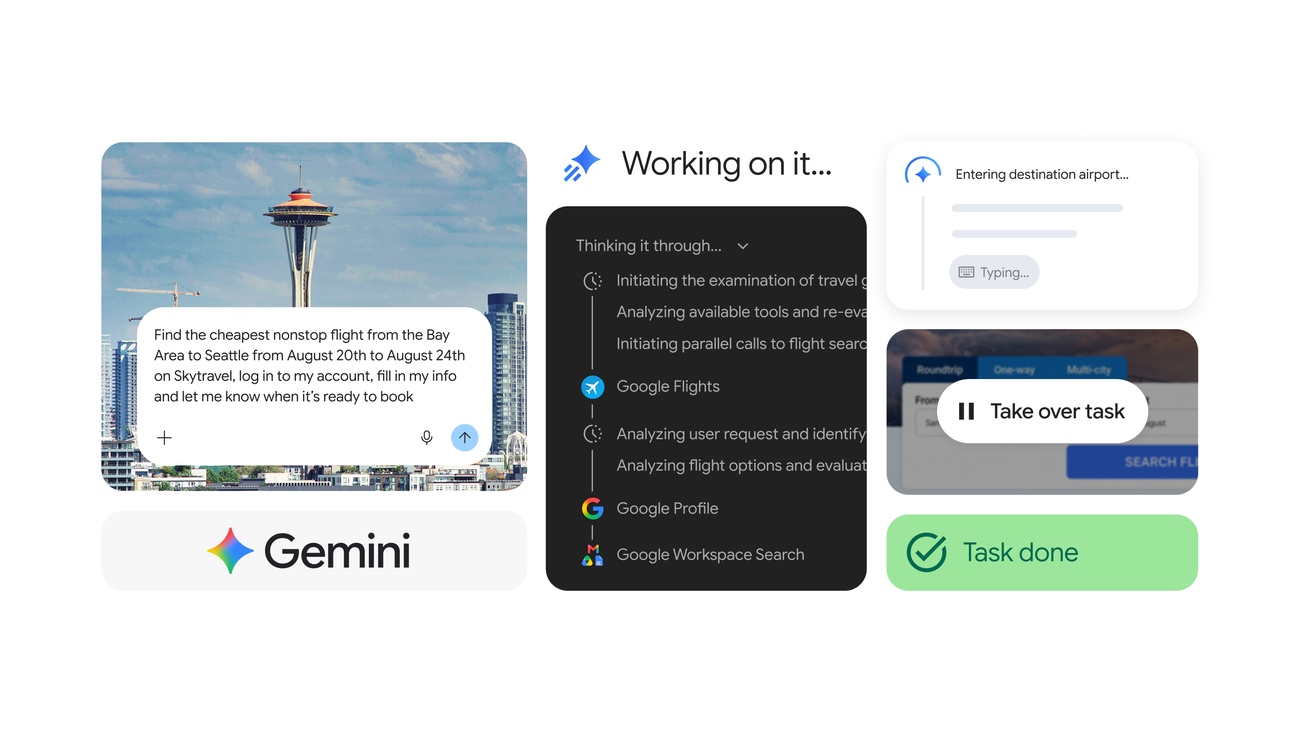
On July 30, Google released a feature that connects its AI agent Gemini Spark directly to Chrome[1]. With the user's permission, Spark can draw on accounts already signed in to Chrome and passwords saved there to work through tedious web errands, such as scheduling apartment viewings or researching flight options. Heavier steps like payment are handed back to the person. Google also widened availability to more than 160 additional countries for Google AI Pro subscribers[1].
From a remote browser to the Chrome on your desk
Until now, Spark reached the web through a remote browser running on Google's side. This update adds the desktop version of Chrome running on the user's own machine as something the agent can operate[2]. Because the sign-in state and saved passwords already sitting in that browser can be used directly, Spark can now push past the login walls that previously stopped it. That is the real change here.
Google offered two examples: booking viewings for saved listings, and researching flight options and starting the booking process[1]. Both are chores that involve moving between several sites and re-entering the same information.
Spark already had a set of tools around it, including Connected Apps that link to Workspace and Search, Personal Intelligence for user context, a remote computer with code execution, and Canvas. Chrome auto browse joins that list[2]. Once access is granted, an indicator for Gemini and auto browse appears in Chrome's top bar, so it is visible on screen when automated control is running[2].
Handing the task back before payment
Once you hand your login credentials to an AI, the question of what safeguards exist matters. Google points to two. The first is protection against prompt injection, an attack in which malicious instructions hidden in a web page or document push the AI into unintended actions. The second is the behavior of returning control to the user when the task reaches something sensitive, such as a payment[1].
Google has not, however, described how the prompt injection protection works technically, nor has it disclosed how thoroughly it was tested against known attack methods[3]. Features of this kind have repeatedly been shown to be vulnerable to instructions hidden where humans cannot see them, such as white text on a white background or HTML comments, so the effectiveness of these defenses remains unverified from the outside[3].
On the user's side, a Take over task control in the Spark task view lets you reclaim the browser at any time. In certain situations, such as entering passwords or payment details, Gemini itself will ask you to take over[4]. Up to 15 tasks can run at once, and beyond that you have to wait for earlier tasks to finish[4]. Credentials stored in the remote browser can be deleted in bulk from the settings screen[4].
More than 160 countries, but not Europe or the UK
The second announcement covers geography. Spark is now open to Google AI Pro subscribers in more than 160 additional countries[1]. It arrives just after the full US rollout completed earlier this month, so the reach went international in one step[2].
It is not worldwide, though. The European Economic Area, Nigeria, Switzerland and the United Kingdom are excluded, and that applies to both the Chrome integration and the geographic expansion[3]. With all of Europe left out, a sizable advertising market has no way to test or plan around the feature for now[3]. Google has explained neither the reason for the exclusion nor when it might lift[3]. Google has also not published the specific list of covered markets, so users in any given country, Japan included, will need to check the app itself.
The conditions are spelled out as well. You must be 18 or older, use a personal Google Account rather than a work or school account, hold a Google AI Pro or Ultra subscription, and have activity saving turned on[3]. Chrome auto browse carries a further restriction: for now, only Spark running in desktop Chrome can use it. Even where Spark itself is available, it does not extend to mobile browsing[3].
On price, Google AI Pro costs 19.99 USD per month (about 3,200 yen) and the higher Ultra tier costs 99.99 USD per month (about 16,000 yen)[3].
※1 USD = 160 JPY (as of July 31, 2026)
Three steps in two and a half months
Spark has expanded in a consistent pattern. It started at Google I/O 2026 on May 19 as a background assistant built on Gemini 3.5 Flash, limited to the United States[3]. A macOS version followed in beta on June 30, restricted to Ultra subscribers in the US[3]. Then on July 30 came the expansion to more than 160 countries for AI Pro subscribers, along with the Chrome integration starting in the US[1][3].
Features are tested first on the top tier and in the United States, then handed down to lower tiers and other regions once Google is satisfied. This announcement follows the same shape: the geographic door swings wide, while the riskier Chrome control stays inside the US. Put the other way around, the moment Chrome auto browse leaves the United States will be a useful signal of how confident Google has become in the safety of this mechanism.
Summary
The Chrome integration moves Gemini Spark from an agent that merely looks at the web to one that acts as the signed-in version of you. The examples Google gave, apartment viewings and flight research, sound mundane, but handing over saved passwords is not a light premise. Handback before payment, the ability to reclaim control, and prompt injection defenses are all in place, yet none of them has been verified externally. What to watch first is how the feature gets used in the US, and whether Europe and the UK stay excluded.
Source: https://blog.google/innovation-and-ai/products/gemini-app/gemini-spark-updates-july-2026/
Source: https://9to5google.com/2026/07/30/gemini-spark-chrome-auto-browse/
Source: https://ppc.land/gemini-spark-blocks-eu-and-uk-users-as-google-adds-160-countries/